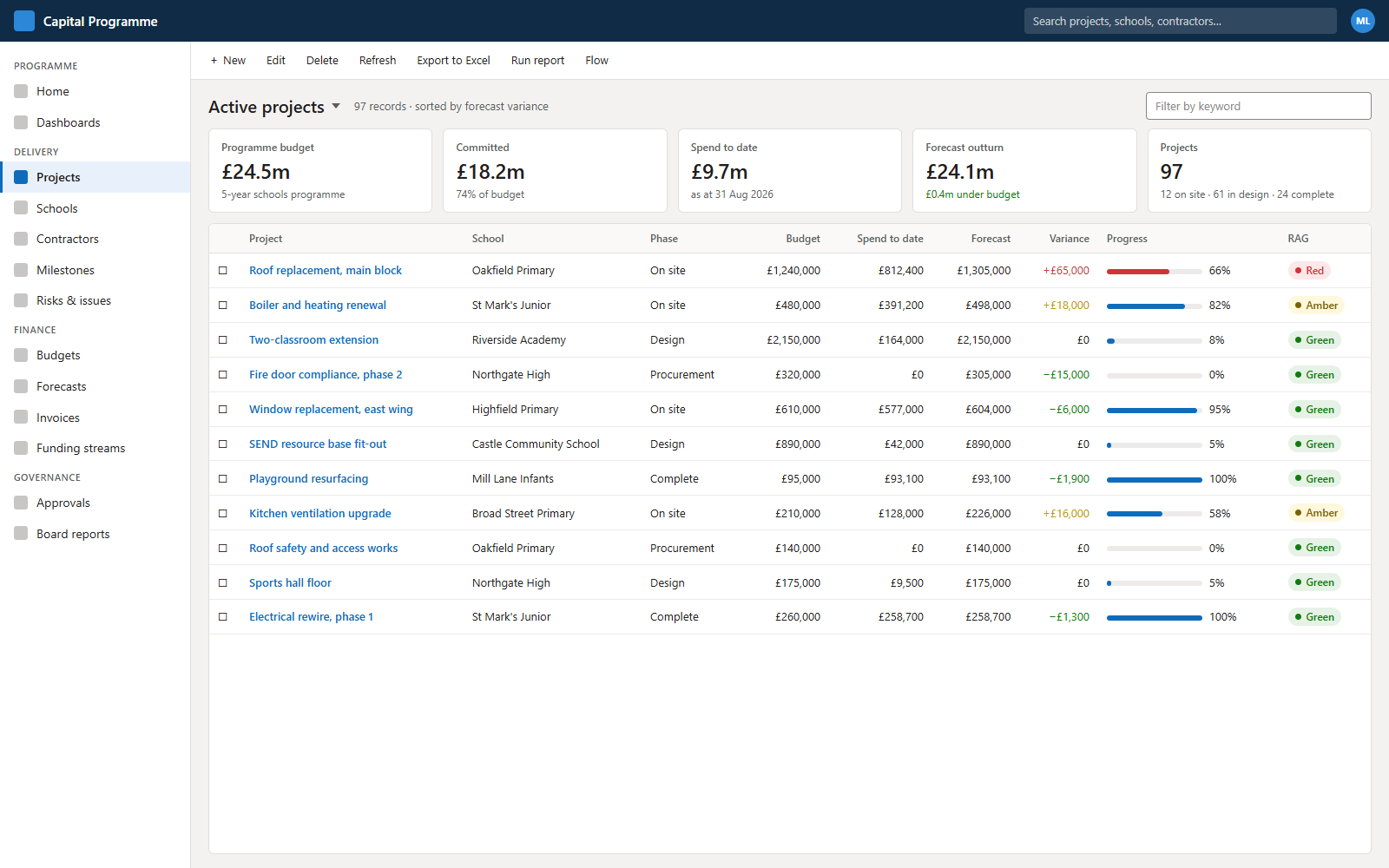
The problem
The organisation delivers a large, ongoing programme of school building works (planned condition works, urgent reactive repairs, SEND inclusion projects and window-replacement schemes on listed buildings) funded from several grant streams. It was run across multiple disconnected artefacts: an Excel project tracker, separate SharePoint report trackers, Teams lists and a personal reporting spreadsheet, with finance data living in an entirely separate system.
That produced a familiar set of problems:
- No single source of truth: the same project existed in several places, causing duplication and mismatches.
- No validation: free-text entry and inconsistent values, updated sporadically, so the tracker rarely reflected reality.
- Spend was hard to tie to projects: one project can carry several purchase orders and invoices, and school-procured works have no purchase order at all.
- Manual reconciliation and reporting: matching actual spend to each project, and compiling DfE statutory returns and quarterly corporate returns, consumed significant officer time and was funnelled through one person.
- Spreadsheet risk: insecure, no audit history, and prone to breaking when several people edited at once.
My role and approach
I owned the project from discovery through to build, working within the organisation’s Power Platform governance framework, a staged process (as-is scoping → to-be and technical scoping → development → UAT → go-live), each stage gated by a technical-board decision.
- Ran structured workshops with the service manager, finance and surveyors to map the current process, capture pain points and agree the target process.
- Produced the governance artefacts each stage requires: as-is and to-be process maps; a technical scoping document covering environments, licensing, connectors, integrations and data handling; a full Dataverse schema specification; and input to the Data Protection Impact Assessment (DPIA).
- Prioritised ruthlessly into an MVP plus later releases, so the highest-value, highest-risk items (finance linkage and both procurement routes) were proven early.
The solution
A Dataverse-backed canvas app is the day-to-day tool for creating and tracking projects, entering finance references, and viewing status and dashboards. A Power Automate layer sits behind it for reminders, notifications, an automatic audit ledger and (in a later release) report generation. Reference/property data lives in a lightweight SharePoint list; project documents stay in SharePoint and are linked rather than embedded; and actual spend is read from the organisation’s finance extract in the data warehouse rather than duplicated.
Everything is project-centric: a single project record is the backbone, and every other record links back to it, so the same project is referenced consistently across delivery, finance and reporting.
Data model (technical deep dive)
I designed a relational model of 13 custom Dataverse tables (plus the native user table for people and ownership), normalised to third normal form, in four groups:
- Core: programme, school/property, funding source, project.
- Delivery & tracking: milestones, an append-only progress ledger, governance stages, document links.
- Finance: suppliers, purchase orders, invoices, capitalised timesheets.
- Reporting: a year-end snapshot.
Design choices worth calling out
- Repeating items (orders, invoices, milestones, governance stages, timesheets) are separate rows, not columns; shared entities (schools, suppliers, funding sources) are lookups rather than repeated free text.
- Controlled values via global option sets, with free text limited to narrative fields.
- Natural-key alternate keys (project number, property UPRN, supplier ID) to prevent duplicates and support future integration matching.
- Roll-up fields on the project for total committed spend (from POs), actual spend (from invoices) and capitalised staff cost.
The two procurement routes were the crux of the model. Centrally procured work flows project → purchase order → invoice. School-led work has no purchase order, so the invoice links straight to the project, with a composite match (invoice number + supplier ID) guaranteeing a unique, reconcilable reference. Both routes share a single invoice/actual-spend table.
Automation and business logic
- Auto-numbering: each project gets a unique reference on creation.
- Stage-gating: business rules (with a flow where cross-table checks are needed) stop a project progressing until the right conditions are met: no order without a parent project; no move to “on site” or “practical completion” without the required dates and linked spend; no move to procurement without an approved governance record for the required gate.
- Automatic progress ledger: a flow writes an immutable history row on every status or RAG change, capturing old and new values, the author and a timestamp.
- Reminders: a scheduled flow sends Outlook/Teams reminders for projects with no recent update, or milestones falling due.
- Assisted reporting: report generation that selects the correct decision/award template by value band and procurement route, and exports aligned to DfE statutory returns and the corporate quarterly return.
Security, audit and compliance
- Role-based access: surveyor/project manager (create and update), service manager/administrator (plus configuration, approvals and reporting), and read-only viewers for finance and the programme board.
- A deliberate audit strategy under a real constraint (tenant-wide auditing wasn’t enabled): no delete privilege on any table (records raised in error are deactivated with a status reason); append-only ledgers for progress history and year-end snapshots (create/read only); automatic created/modified stamps for attribution; and selective native auditing on core tables and critical columns once available. Together these give a defensible audit trail without relying on tenant-wide audit.
- Data protection: OFFICIAL classification with a low personal-data footprint (staff names appear only through ownership and timesheets); DPIA prepared as part of the governance process.
Key technical decisions
Surface spend, don’t duplicate it
Actual spend stays authoritative in the finance system and is read from the data-warehouse extract, linked by PO number (centrally procured) or invoice + supplier ID (school-led). This keeps Dataverse lean and avoids a fragile two-way sync; identifiers are keyed manually in the MVP, with an automated picker as a later enhancement.
A Programme grouping table instead of many-to-many
Multi-site schemes are modelled as one programme with one project per school, keeping roll-ups a single hop from the project and avoiding a many-to-many relationship.
Link documents, don’t embed them
Reports and drawings stay in SharePoint and are referenced by URL, avoiding Dataverse storage cost and keeping documents where users already manage them.
Mirror existing column names
Fields deliberately echo the current tracker and the finance extract, easing user familiarity and making the future automated feed a direct mapping.
Deliberate denormalisation for reporting integrity
The year-end snapshot stores a few reported values as text (e.g. funding source name) so figures “as reported” survive later changes to reference data.
Canvas app plus automation, not automation alone
Day-to-day management needs an interactive app; the reminders, notifications and report generation need a flow layer. The two together, not one or the other.
Delivery approach
- Managed-solution ALM: a Dataverse solution promoted Dev → Test → Production on the organisation’s standard environments, with no app-specific environment required.
- Phased delivery: an MVP for go-live (lifecycle, validation, finance linkage, reminders, ad-hoc/executive reporting), then a second release for automated statutory/quarterly returns and an automated finance picker, then future external school-partner access.
- Continuous UAT: regular walkthroughs with the service manager and surveyors throughout, surfacing business-critical items early to de-risk delivery.
Outcomes
The app is live and gives the team a single, validated source of truth for the whole programme. The benefits it delivers: a significant reduction in officer time spent on statutory returns, reconciliation and tracker upkeep; better data quality and completeness; and more timely, reliable reporting for finance and the programme board.
Skills demonstrated
- Solution architecture
- Relational data modelling (3NF)
- Microsoft Dataverse
- Canvas app development
- Power Automate
- Business rules & workflow automation
- Role-based security & audit design
- Requirements gathering
- Data protection / DPIA
- Public-sector delivery
- ALM